
A TYPO3 update can be carried out quite quickly using the Install Tool. However, this requires certain prerequisites on the server, over which you often have no control.
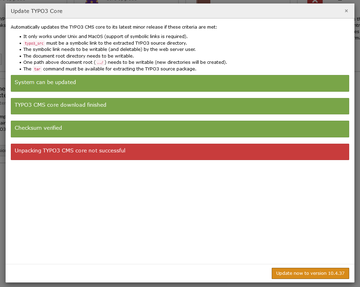
A TYPO3 update within a release (e.g., from TYPO3 12.4.XX to TYPO3 12.4.36) can be performed directly in the TYPO3 system. The prerequisite for this is that the system is located on a Linux server, the sources are in the correct directory, and the server can unpack “*.tar.gz” archives.
To do this, log in to the TYPO3 backend and go to Installation/Administration Tools under “System” or “Update.” After activating (in older versions) and logging in, you will find the button for testing the currently installed TYPO3 version directly on the “Update TYPO3 Core” page.
When you click on “Check for core updates,” the system first checks whether there is a more recent version of TYPO3 available. If the result is, for example, “There are no TYPO3 updates available,” you do not need to do anything else. You already have the latest version of TYPO3. However, “Update to regular released version XXX is available!” tells you that there is a newer version available, which you can then install directly by clicking “Update now.”
The TYPO3 installation tool will now check whether this version can be upgraded, download the corresponding package, install it immediately, and clear the cache. After that, you only need to reload the entire page once and you should then see the new version in the top left corner next to the TYPO3 logo.
However, if TYPO3 determines that your system does not meet the requirements, you must either adapt it or update your TYPO3 manually. A major release change (e.g., from TYPO3 12 to 13) must also be done manually or as described here.